问题
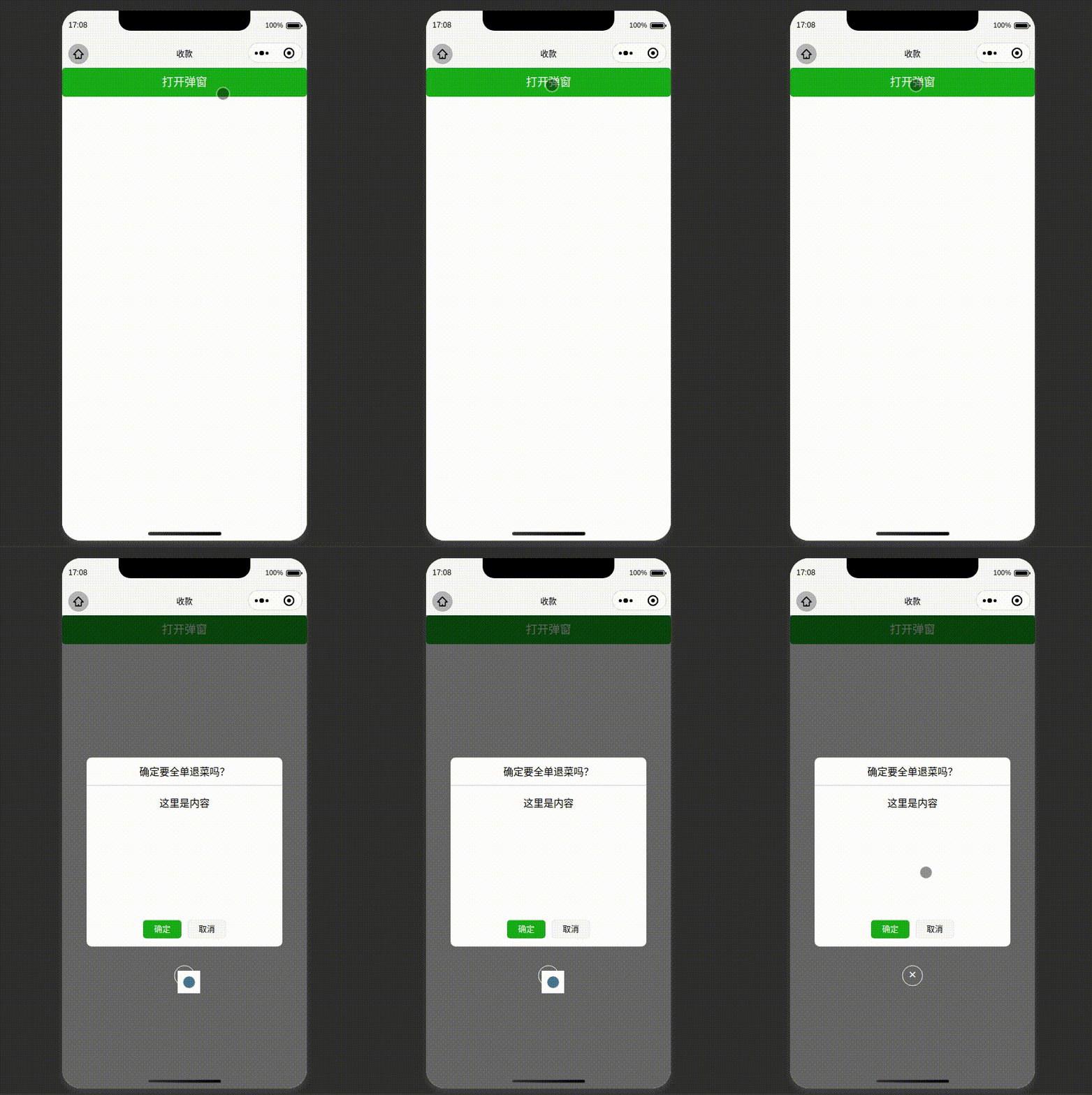
接上一篇弹窗操作技巧,因为例子里的弹窗布局总是怪怪的,这里给出弹窗内部布局的最佳实践。
实例
原有基础上的改动:
1.close按钮的样式;
2.pop-content的内容高度;
具体如下:
弹窗组件(zwy-popup.vue):
<template>
	<view v-show="ishide" @touchmove.stop.prevent>
		<!-- 遮罩 -->
		<view class="mask" :style="maskStyle"></view>
		<!-- 内容 -->
		<view class="tip" :style="tipStyle">
			<slot></slot>
		</view>
	</view>
</template>

<script>
	export default {
		props: {
			// 控制弹窗显隐
			ishide: {
				type: Boolean,
				required: true
			},
			// 设置弹窗层级
			zindex: {
				type: Number,
				default: 99
			},
			// 设置遮罩透明度
			opacity: {
				type: Number,
				default: 0.6
			},
			// 设置内容区宽度
			width: {
				type: String,
				default: '500rpx'
			},
			// 设置内容区高度
			height: {
				type: String,
				default: '500rpx'
			},
			// 设置内容区圆角
			radius: {
				type: String
			},
			// 设置内容区底色
			bgcolor: {
				type: String,
				default: '#FFFFFF'
			}
		},
		computed: {
			// 遮罩样式
			maskStyle() {
				return `
					z-index:${this.zindex};
					background:rgba(0,0,0,${this.opacity});
				`
			},
			// 内容样式
			tipStyle() {
				return `
					width:${this.width};
					height:${this.height};
					z-index:${this.zindex+1};
					border-radius:${this.radius};
					background-color:${this.bgcolor};
				`
			}
		}
	}
</script>

<style scoped>
	.mask {
		position: fixed;
		bottom: 0;
		right: 0;
		left: 0;
		top: 0;
	}

	.tip {
		position: fixed;
		left: 50%;
		top: 50%;
		transform: translate(-50%, -50%);
	}
</style>
引用实例(receipt.vue):
<template>
  <view>
    <button type="primary" @click="openWindow">打开弹窗</button>
  </view>
  <zwyPopup :ishide='show' width="80%" height="40%" radius="16rpx">
    <view class="pop-head">
      确定要全单退菜吗?
    </view>
    <view class="pop-content">
      <view class="pop-main">
        这里是内容
      </view>
      <view class="btn-zone">
        <button type="primary" size="mini">
          确定
        </button>

        <button @click="show = false" size="mini">
          取消
        </button>
      </view>
    </view>
    <view class="close" @click="show = false">✕</view>
  </zwyPopup>
</template>

<script setup>
import { ref } from 'vue';
import { zwyPopup } from '../../components/zwy-popup/zwy-popup.vue';

var show = ref(false);

function openWindow(){
  show.value = true;
}
</script>

<style lang="scss" scoped>

.pop-head {
  text-align: center;
  border-bottom: 2rpx solid #ccc;
  padding: 20rpx;
}

.pop-content {
  margin-top: 30rpx;
  width: 100%;
  height: 80%;
  display: flex;
  align-items: center;
  flex-direction: column;
  justify-content: start;

  .pop-main{
    width: 100%;
    height: 100%;
    display: flex;
    align-items: center;
    flex-direction: column;
    justify-content: start;
    overflow-y: scroll;
    background-color: #fff;
  }

  .btn-zone {
    margin: 20rpx 0;
    justify-content: space-between;
    display: flex;
    flex-wrap: wrap;
    align-content: start;
    font-size: small;

    button {
      margin: 5rpx 10rpx;
    }
  }
}

.close {
  width: 60rpx;
  height: 60rpx;
  color: #FFFFFF;
  line-height: 60rpx;
  text-align: center;
  border-radius: 50%;
  border: 1px solid #FFFFFF;
  position: relative;
  bottom: -10%;
  left: 50%;
  transform: translate(-50%, 0);
}
</style>
总结
这里在原有实例的基础上做了改进,使布局看起来更合理,更好看。
添加标题,就在<view class="pop-head">里实现;
添加内容就在<view class="pop-content">里实现;
想修改按钮,就在<view class="btn-zone">里操作;